
This is the fourth part of a blog post series detailing HTEC’s first-hand investigation into the feasibility of delegating the development of full-fledged software solutions to AI tools.
You can read the first three installments on the following links:
Requirements and System Design
The series spans the experiences of one of HTEC’s most experienced Solution Architects, Zoran Vukoszavlyev, in relying exclusively on AI tools through all stages of a simulated software development project. This blog post focuses on the process of generating the first service, connecting backend and frontend, and testing.
To quickly recap the previous stages of the investigation, Zoran successfully generated the initial layers: requirements, architecture, and infrastructure. Since the architecture proposed by AI was based on microservices, Zoran made the strategic choice not to generate the entire solution with a full set of services at once. Instead, he focused on a single service with all its crucial aspects – defining its API, implementing the backend services, and generating the related UI and tests. He opted for the Patient Management service as an exemplary aspect of the HLS-focused simulation project.
Winding road to success
As mentioned in the previous stages, Zoran initially opted for several less frequently used technologies as the foundation for the generated code. Realizing that AI struggled with more exotic technologies, after three failed attempts, he switched to the most used technologies: Java Spring Boot for the backend and React for UI.
For this stage, Zoran opted against manually creating skeleton code that would serve as an example to the AI model, believing that Spring Boot would work well without additional teaching or context building. Instead, he simply started prompting – asking AI for options, discussing them, and going with what he felt was the best choice.
The entire output was committed to Git split into separate branches. If an attempt was a failure, Zoran would keep that feature branch hanging alone and restart the development from that branching point. This allowed reverting to any previous point without polluting the implementation. This approach may not be ideal for production because it’s very granular and hard to oversee, but it works well for prototyping.
After switching to more common technologies, the fourth attempt proved more successful. The focus of this stage quickly became context management. In addition to chat context limitations, Zoran soon noticed that the AI selectively used chat history, consistently drawing on the earliest and latest information while occasionally skipping the middle — an issue visible in the generated code. This was the case with both Amazon Q and Claude AI. The issue seems independent of previously discussed context compressing, as Zoran noticed it happening even before compression took place.
As the context keeps growing, more relevant details are skipped and forgotten, leading to faulty code – making it necessary to keep the context relevant and intact. Zoran tried to resolve this by simplifying matters. Even though the patient service manages multiple resources, he instructed the AI to focus on the basic use cases of a patient, and the extra functions would be added later.
Focusing on the core operations of a single resource yielded much better results. For example, focusing solely on a patient table in the database or the individual entities in that table resulted in an optimal size for the context where the results were good and predictable.
Improved outcomes
The next phase included generating the backend code for the patient management service. According to Zoran’s calculation, more than 90% of the implementation was good. In other instances, the implementation required improvement. Most issues were caused by AI using hardcoded strings and numeric values (magic strings and magic values instead of constants).
At this stage, security was implemented for the first time. Considering that Zoran had a local infrastructure for the project, he had a fully configured security system.
Once Zoran created the backend and added all the necessary functions to the patient service, he held a demo for HTEC’s internal stakeholders. The feedback was solid: the solution looked good from the technology side, but it wasn’t particularly presentable from the visual standpoint, making UI generation the next focus.
As this was a simulation project without any UX mockup to work with, the focus shifted to two questions:
- How good is AI at generating UX design (user journeys, clickable prototypes, etc.)
- How good is AI at implementing an existing UX
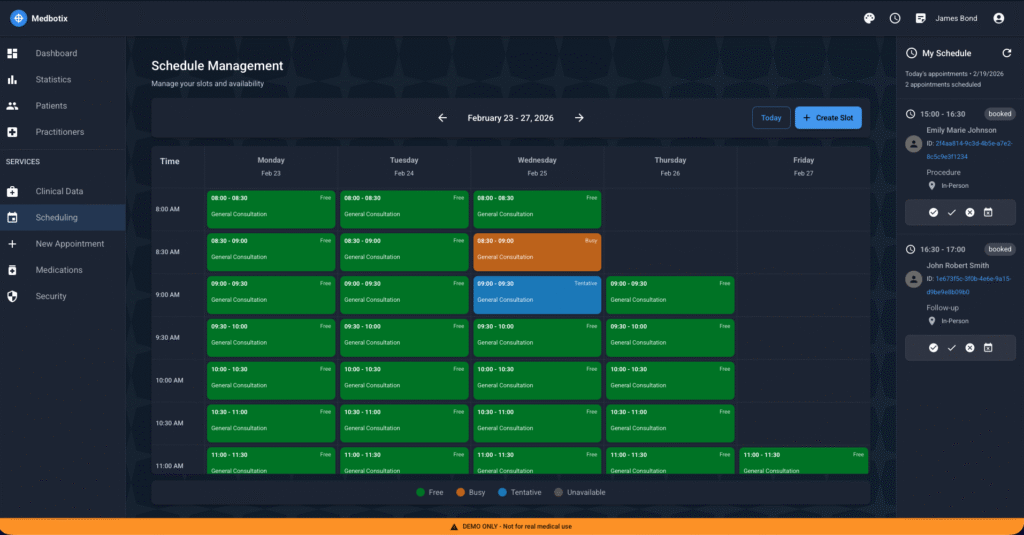
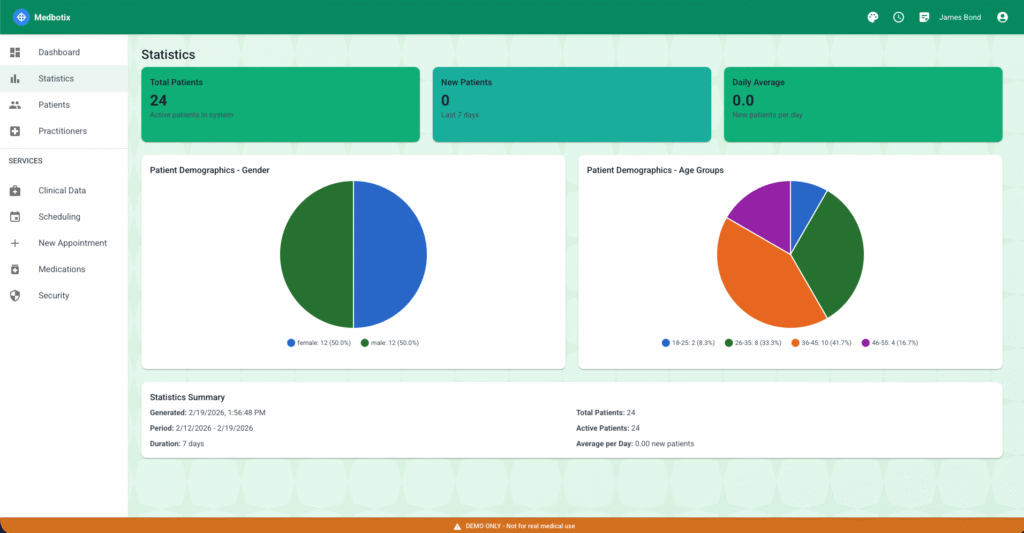
For UX generation, Zoran used Claude AI. The initial prompt was to investigate the latest trends in healthcare UI design and provide suggestions on state-of-the-art behavior. From there, he provided the API definition to the model, instructing AI to use the data provided from the backend to suggest user interfaces with React and Material UI. At this stage, Zoran didn’t integrate the backend and the frontend, instead instructing AI to imagine that there would be a backend service, but to use the hardcoded data on the UI side for the present.
Even with such minimal input, Claude AI generated a good UI. Expectedly, it needed some manual refinement, but it still took less than three days to have a good-looking, functional user interface. Keeping everything basic and simple once again proved most effective. AI struggled with more sophisticated UI techniques, such as infinite scroll – there were multiple bugs and unexpected behavior. Advanced UI techniques were therefore avoided, as manual fixes would require significant time and effort.
Zoran created patient screens with hardcoded data. The AI-generated UX was simple and effective. It contained individual patient profile pages with basic information and functionalities (editing, adding new profiles, etc.), and the patient list was indexed and fully searchable.
At a later point, Zoran connected the backend and frontend, enabling the solution to use the backend of the data source instead of the hardcoded data.
Tried and tested
On multiple occasions during code generation, parts of the previous code – and sometimes entire functions – were removed by mistake. Even though it is supposed to keep updating the same source file, AI sometimes wouldn’t insert new code but recreate it from scratch, with certain functions missing. This required Zoran to focus on auto testing, even on a high level: he needed to implement end-to-end API testing, unsure if otherwise he would catch a function being removed by mistake or allocation.
The AI-powered end-to-end testing proved challenging. The AI model suggested a combination of testing technologies (separate technologies for the UI, the REST API, and the GraphQL API), but was unable to generate the test code for those technologies, so Zoran had to restart the session.
For the next iteration, the model was instructed to generate UI and API testing using the Playwright framework. Despite relying on established and commonly used technologies like Node JS and TypeScript, as a relatively new framework, Playwright turned out challenging for the AI model.
After several failed iterations and AI model’s inability to generate solid tests with Playwright, Zoran chose to manually create a skeleton project that would serve as an example for further AI-generated tests, which helped AI extend the list of test cases. Altogether, the AI models generated close to 130 test cases in the span of a week, including all iterations and manual interventions.
However, there was still a great need for manual intervention in test scenarios, because there were noticeable implementation gaps with the AI-generated UI that hindered testing.
Therefore, Zoran decided to take a step back and update the UI implementation – to place IDs on the components and fill out the component roles to make it testable. He asked the AI model for a set of requirements that would make a React UI testable, and then fed those requirements to another AI model, which then updated the UI code to leverage data test IDs. However, Zoran emphasizes that some of these steps may have been foreseen or skipped entirely by a more experienced React developer.
This step back in UI implementation brought Zoran to what he calls “Milestone Zero”, where he could connect the UI to the backend and have all the APIs and end-to-end tests return green. After another demo and promising feedback, he was given the green light to continue generating other services, with a particular focus on how AI handles complex business logic.
Key results to consider
- The 4th iteration that resulted in a fully operational patient service took about 180 hours. In practice, this means that AI, assisted by an experienced Solution Architect, can achieve a single microservice with backend, frontend, and tests fully implemented in about five weeks.
- A meticulous analysis of the AI-manual ratio of work showed that AI created 94% of the code lines, and 6% was manual intervention, including the skeleton project and the manual fixes.
- On average, there is about two times more code being generated than it is committed to the source folder. This is an important consideration with AI-accelerated development – it is a major cost implication, whether we are charged by tokens or by lines of code.
- Against HTEC’s Product Quality Checklist, a set of criteria meant to quantify the quality of a software solution, the generated solution met 6 of 13 Priority 1 expectations, as well as 7 of 13 Priority 2 expectations. Zoran states that he has seen commercial solutions that have performed worse under these criteria.
Stay tuned for the next installment of the series, detailing the complete final AI-generated solution.